Posts

Showing posts with the label Android

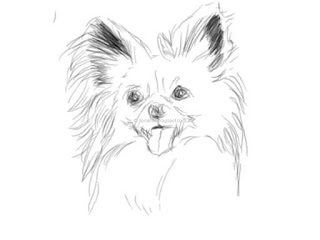
Digital Dog Portrait
Image
Another digital art piece done using the Android App - Serious Paint  on a tablet. This time I was trying out different brushes - pencil , soft shader , and blend, and varying the brush diameter. I used the Save function to save the work-in-progress at different stages this time, as shown below. I must say the Blend brush result looks like blending charcoal with my finger. Pencil sketch outline Beginning color shading Final piece I used a rubber tip stylus and at times my finger. Sometimes, I wish the stylus was more sensitive and it didn't drag and stick on the screen as much.


Portrait of a cat painted on a tablet using the Serious Paint Android app

Image
Here is a digital art of a cat(!) painted on an HP Touchpad running Android Jelly Bean using this nice free app - Serious Paint  and a cheap rubber tip stylus. The Serious Paint app looks similar to another Android app for painting - Infinite Painter but it is much more stable; Infinite Painter keeps crashing all the time to the point that you can't do anything worthwhile.

How to make an Android menu icon using Inkscape

Image
The Android 2.3 Gingerbread menu icons have a standard look and feel to them, according to the Android Menu Icons Design Guide at  http://developer.android.com/guide/practices/ui_guidelines/icon_design_menu.html . It is possible to use Inkscape to create menu icons for Android as illustrated in the steps below. Create and setup the document Run Inkscape . Select File | Document Properties . The Document Properties dialog box appears . In the Width and Height fields, type in the largest menu icon hdpi size e.g. 72 pixels. Close the dialog box. Use the Create Rectangles and Squares (F4) command and place a square on the page to serve as the recommended bounding box 48x48 pixels for the icon. Select the rectangle. Change the Width and Height to 48 pixels. Select Object | Align and Distribute . The Align and Distribute pane appears . Set the Align Relative to Page . Click on the Center to Vertical Axis and Center to Horizontal Axis buttons.  Select Layer | L...